
.png)
R-Variables
A variable is a name given to a memory location, which is used to store values in a computer program. Variables in R programming can be used to store numbers (real and complex), words, matrices, and even tables. R is a dynamically programmed language which means that unlike other
programming languages, we do not have to declare the data type of a variable before we can use it in our program.
For a variable to be valid, it should follow these rules
- It should contain letters, numbers, and only dot or underscore
- It should not start with a number (eg:- 2iota)
- It should not start with a dot followed by a number (eg:- .2iota)
- It should not start with an underscore (eg:- _iota)
- It should not be a reserved
Reserved Keywords in R
Following are the reserved keywords in R
NA:– Not Available is used to represent missing values. NULL:- It represents a missing or an undefined value. NaN:– It is a short form for Not a Number(eg:- 0/0).
TRUE/FALSE: – These are used to represent Logical values.
Inf :– It denotes Infinity(eg:- 1/0).
If else, repeat, while, function, for, in, next, and break:– These are Used as looping statements, conditional statements, and functions.
… :- It is used to pass argument settings from one function to another.
NA_integer_, NA_real_, NA_complex_, and NA_ character _:- These represent missing values of other atomic types.
For example:
- x = 15 implicitly assigns a numeric data type to the variable ‘x’.
- mystring = “Hello, Meritshot”
Variable Assignment
The variables can be assigned values using leftward, rightward and equal to operator. The values of the variables can be printed using print() or cat() function. The cat() function combines multiple items into a continuous print output. # Assignment using equal operator. var.1 = c(0,1,2,3)
# This assigns a vector containing the numbers 0, 1, 2, 3 to the variable ‘var.1’ using the equal (`=`) operator.
# Assignment using leftward operator.
var.2 <- c(“learn”,”R”)
# This assigns a character vector containing the strings “learn” and “R” to the variable ‘var.2’ using the leftward assignment (`<-`) operator.
# Assignment using rightward operator.
c(TRUE,1) -> var.3
# This assigns a vector containing the logical value TRUE and the number 1 to the variable ‘var.3’ using the rightward assignment (`->`) operator.
# Print the value of var.1 using the print() function.
print(var.1)
# Use the cat() function to concatenate and print text and the values of var.1.
cat (“var.1 is “, var.1 ,”\n”)
# Print var.2 using cat() to concatenate and output text and the value of var.2.
cat (“var.2 is “, var.2 ,”\n”)
# Print var.3 using cat() to concatenate and output text and the value of var.3.
cat (“var.3 is “, var.3 ,”\n”)
When we execute the above code, it produces the following result – [1] 0 1 2 3
var.1 is 0 1 2 3 var.2 is learn R var.3 is 1 1
Data Types of a Variable
In R, variables can hold data of different types, and these types are essential for determining how operations can be performed on the data. Below are the primary data types in R:
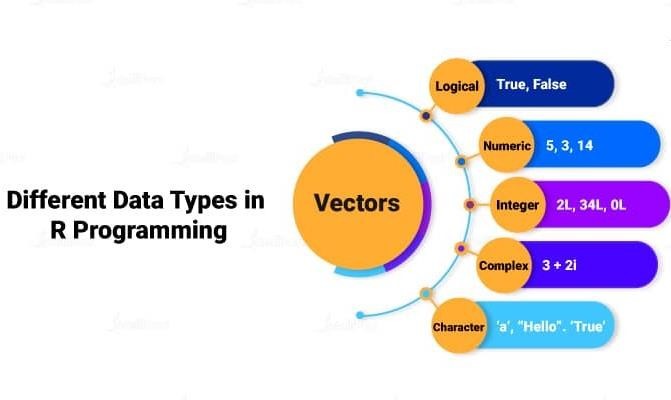
1. Numeric
In R, if we assign any decimal value to a variable it becomes a variable of a numeric data type.
For example, the statement below assigns a numeric data type to the variable “x”.
- This data type stores numbers, both integers and real numbers (decimals).
- By default, R treats numbers as double precision real
Examples:
x <- 10.5 # A numeric (double) value
y <- 5 # Also considered numeric (double) by default
class(x) # “numeric”
typeof(x) # “double”
2. Integer
To create an integer variable in R, we need to call the (as.Integer) function while assigning value to a variable.
e = as.integer(3) class(e)
Output: [1] “integer”
Note
- Integers are whole numbers without decimal
- You can explicitly define integers by appending an “L” after the
Examples:
z <- 5L # This is an integer
class(z) # “integer”
typeof(z) # “integer”
1. Character (String)
- Used to store text or string In R, strings are enclosed in either double quotes (” “) or single quotes (‘ ‘).
name <- “Roshan”
class(name) # “character” typeof(name) # “character”
2. Logical (Boolean)
A logical value is often generated when two values are compared.
- Logical values in R are either TRUE or
- These are typically used for conditions and
x = 3
y = 5
a = x > y a
#Output:
#FALSE
flag <- TRUE
class(flag) #Output “logical” typeof(flag) #Output “logical”
- Three standard logical operations ,i.e., AND(&), OR(|), and NOT(!) yield a variable of the logical data
For example:-
x= TRUE; y = FALSE
x & y
#Output:
#FALSE
x | y
#Output: TRUE
!x
#Output: FALSE
4. Complex Data Type
- The values containing the imaginary number ‘i’ (iota) are called complex values.
- Complex numbers are numbers with both real and imaginary
For example:-
x = 3
y = 5
a = x > y a
#Output:
#FALSE
v = 2 + 5i
# Assign a complex number to variable ‘v’ using the equals operator
print(class(v)) # Print the class of ‘v’
#Output : Complex
Finding Variables
To know all the variables currently available in the workspace we use
the ls() function. Also the ls() function can use patterns to match the variable names.
- ls() Function
- Purpose: Lists all the variables (objects) defined in the current R
- Syntax: ls()
Example:
x <- 10
y <- “Hello”
ls()
Output:
[1] “x” “y”
1. objects() Function
- Purpose: Similar to ls(), it returns a list of objects (variables) in the current
Syntax:
objects()
Example:
a <- 1
b <- 2
objects()
Output
[1] “a” “b”
In R, you can delete or remove variables from your environment using specific functions. Here’s a detailed summary of how to delete variables:
- rm() Function
Purpose: The rm() function is used to remove one or more variables from the current environment
Syntax:
rm(variable_name)
Example:
x <- 10
y <- “Hello”
rm(x)
# Deletes the variable ‘x’
ls() # Will only list ‘y’ as ‘x’ is removed
2. Removing Multiple Variables
- You can remove multiple variables at once by passing their names to the rm()
Example:
a <- 1
b <- 2
c <- 3
rm(a, b)
# Removes both ‘a’ and ‘b’
ls() # Will only list ‘c’ as ‘a’ and ‘b’ are removed
3. Removing Specific Variables by Pattern
- You can delete variables that match a specific pattern using the ls() function in combination with rm().
Example:
var1 <- 100
var2 <- 200
rm(list = ls(pattern = “var”))
# Removes all variables matching the pattern ‘var’
ls() # Will list no variables if only ‘var1’ and ‘var2’ existed
4. Clearing Hidden Variables
- Hidden variables (starting with a dot .) are not shown by ls() unless To remove them, you can include all.names = TRUE inside ls().
Example:
.hidden_var <- 100
rm(list = ls(all.names = TRUE))
# Removes both visible and hidden variables
These methods help manage and clean up the environment by removing unnecessary or obsolete variables, improving efficiency and memory usage. Let me know if you need more detailed exam