.png)
R-String Methods
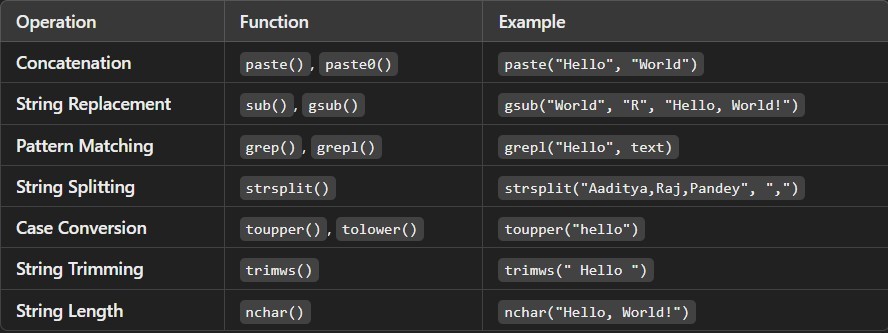
In R, strings are treated as character data types, and there are several useful string methods for performing various operations. Let’s break down the key methods for basic string operations, including concatenation, string replacements, pattern matching, splitting, case conversion, trimming, and calculating string length.
1. Basic String Operations in R
R provides basic functions for working with strings. Strings are represented as character vectors, and individual characters or entire vectors of strings can be manipulated using built-in string
# Basic string example text <- “Hello, Students!”
2. Concatenation
Concatenating strings in R can be done using the paste() or paste0() functions.
- paste(): Allows you to concatenate strings with a separator (e.g., space, comma, ).
- paste0(): Concatenates strings without any
Example:
# Using paste with a space separator (default)
greeting <- paste(“Hello”, “Students”)
print(greeting) # Output: “Hello Students”
# Using paste0 to concatenate without separator
joined_text <- paste0(“Hello”, “Students”)
print(joined_text) # Output: “HelloStudents”
# Custom separator
custom_sep <- paste(“Aaditya”, “Pandey”, sep = “-“)
print(custom_sep) # Output: “Aaditya-Pandey”
3. String Replacements
R allows you to replace parts of a string using the gsub() or sub() functions.
- gsub(): Replaces all occurrences of a
- sub(): Replaces only the first occurrence of a
Example:
# Replacing “Students” with “R”
new_text <- sub(“Students”, “R”, text)
print(new_text) # Output: “Hello, R!”
# Replacing all instances of “u” with “U”
updated_text <- gsub(“u”, “U”, text)
print(updated_text) # Output: “Hello, StUdents!”
4. Pattern Matching
To find patterns in strings, you can use functions like grep(), grepl(), regexpr(), and gregexpr(). These functions allow you to search for specific patterns in strings using regular expressions.
- grep(): Returns the indices of strings that match the
- grepl(): Returns TRUE or FALSE if a pattern is
- regexpr(): Returns the position of the first
- gregexpr(): Returns the position of all
Example:
# Checking if “Hello” is in the text
pattern_found <- grepl(“Hello”, text)
print(pattern_found)
# Output: TRUE
# Finding the position of “World”
position <- regexpr(“World”, text)
print(position)
# Output: 8 (starting index of the match)
# Finding the index of strings in a vector that contain “Hello”
vector <- c(“Hello, World!”, “Hi, there”, “Welcome”)
matched_indices <- grep(“Hello”, vector)
print(matched_indices) # Output: 1
5. String Splitting
You can split a string into pieces using the strsplit() function. This function splits a string based on a specified delimiter.
Example:
# Splitting a string by spaces
split_text <- strsplit(text, ” “)
print(split_text) # Output: List of “Hello,” and “Students!”
# Splitting by comma
split_by_comma <- strsplit(“Aaditya,Raj,Pandey”, “,”)
print(split_by_comma) # Output: List of “Aaditya”, “Raj”, and “Pandey”
6. Case Conversion
R provides functions for converting strings to upper or lower case:
- toupper(): Converts a string to
- tolower(): Converts a string to
Example:
# Converting to uppercase
uppercase_text <- toupper(text)
print(uppercase_text) # Output: “HELLO, STUDENTS!”
# Converting to lowercase
lowercase_text <- tolower(text)
print(lowercase_text) # Output: “hello, students!”
7. String Trimming
R provides the trimws() function to remove leading and trailing white spaces from a string.
Example:
# String with extra spaces
text_with_spaces <- ” Hello, Students! “
# Trimming the white spaces
trimmed_text <- trimws(text_with_spaces)
print(trimmed_text) # Output: “Hello, Students!”
# Trimming only the left or right side
left_trimmed <- trimws(text_with_spaces, which = “left”)
right_trimmed <- trimws(text_with_spaces, which = “right”)
print(left_trimmed) # Output: “Hello, Students! “
print(right_trimmed) # Output: ” Hello, Students!”
8. String Length
You can find the number of characters in a string using the nchar() function.
Example:
# Finding the length of the string
string_length <- nchar(text)
print(string_length) # Output: 13
This function counts each character in the string, including spaces and punctuation marks.
Summary: